Plugin - QR Code Generator
The RSForm!Pro QR Code Generator Plugin allows you to generate QR codes based on form submission values.
The plugin can be downloaded by logging into our website using the account that holds the subscription and heading to Downloads > My Downloads area.
Download the pluginDownloading and Installing the plugin
Download
You can download the plugin by logging with your purchase user, then head to Downloads > My Downloads > RSForm!Pro - view all plugins and modules > RSForm!Pro Files > Plugins > "QR Code Generator".
Install
In the backend of your Joomla! installation go to the Extensions > Install/Uninstall page, and install the plugin. Next thing is to publish the plugin, to do this go to Extensions > Plug-in Manager, search for the "System - RSForm! Pro QR Code Generator Plugin" plugin and publish it.

Configuring the plugin
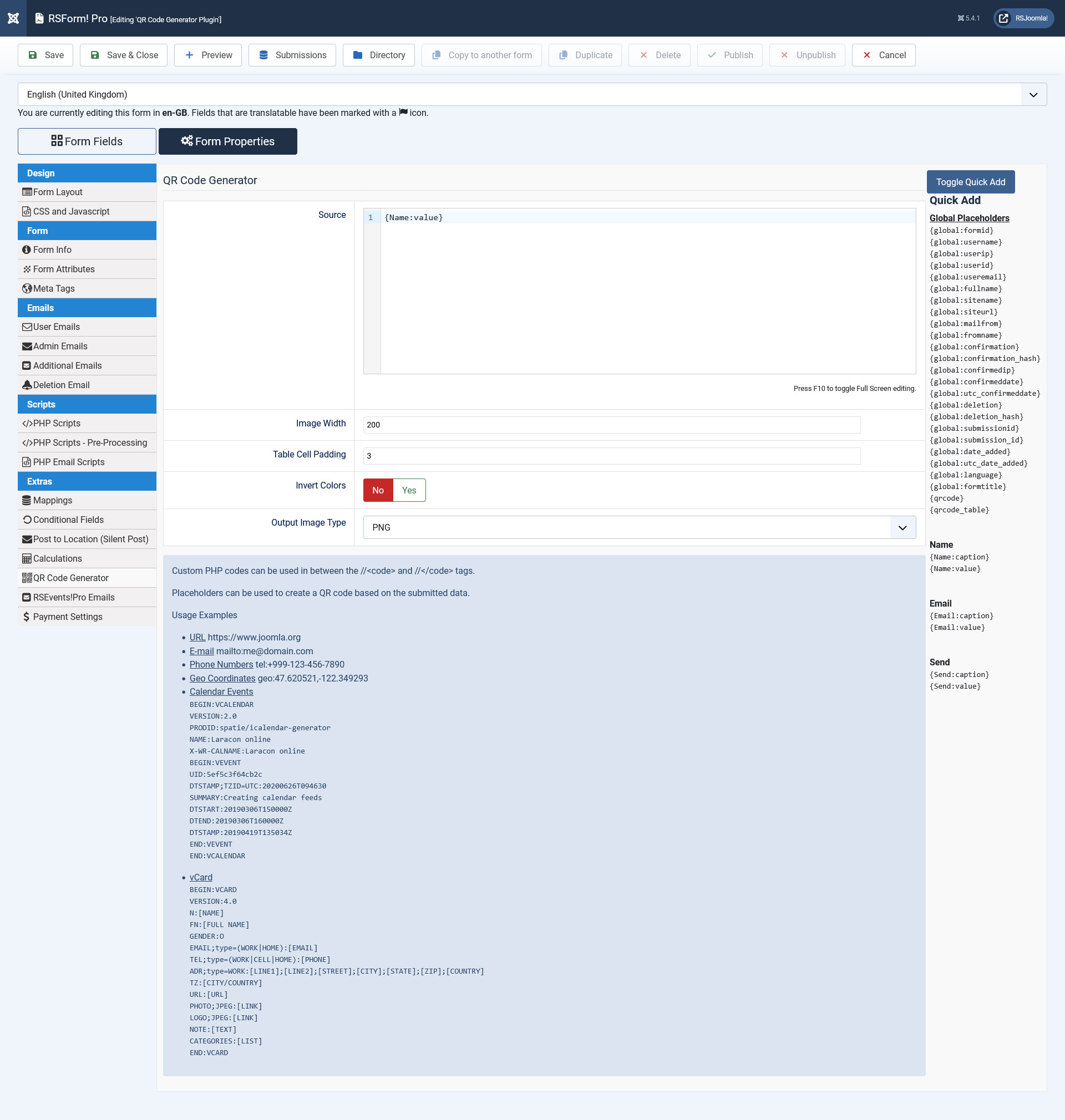
Configuring the QR Code Generator plugin can be done from Components > RSForm!Pro > Edit your form > Form Properties > QR Code Generator tab:
- Source - add here your desired text along with form field placeholders.
- Image Width - set the default width of the QR Code image. Defaults to 200.
- Table Cell Padding - Defaults to 3. This only applies when using the {qrcode_table} placeholder. To increase the size of the QR Code, simply increase the Table Cell Padding - the higher the number, the bigger the {qrcode_table} placeholder will appear. As a general rule, keep this size between 3 and 10.
- Invert Colors - enable this option if you want QR Code image colors to be inverted.
- Output Image Type - choose the QR Code image type used when generating the code through the {qrcode} placeholder (SVG / WebP / PNG / GIF / JPEG / HTML). Usually SVG is the best option as it's a vector format that's widely supported and displays correctly on all screen sizes.
You can display the QR Code image by using the {qrcode} global placeholder, in the following areas:
- Thank You Message
- User / Admin / Additional / Deletion email messages
- User / Admin PDF Layouts
- Submission Directory Details Layout - the PDF file is generated from this layout
- Submission Directory Emails
- Submissions View Menu Item
- Submissions List Module > Details Layout
- RSForm!Pro - RSTickets!Pro Message field
- RSForm!Pro - RSEvents!Pro emails
- RSForm!Pro - Google Sheets - note that this will return the image base64 code in the sheet.
Unfortunately many email services, such as Gmail, do not display embedded images due to security constraints. You can use the {qrcode_table} global placeholder instead. This will generate a HTML table, which should work fine with all email clients.
Usage examples
Placeholders can be used to create a QR code based on the submitted data.
- URL:
https://www.joomla.org
{global:siteurl} - E-mail:
mailto:me@domain.com
mailto:{global:useremail} - Phone Numbers:
tel:+999-123-456-7890
tel:{phone-number-field-here:value} - Geo Coordinates:
geo:47.620521,-122.349293
- Calendar Events:
BEGIN:VCALENDAR
VERSION:2.0
PRODID:spatie/icalendar-generator
NAME:Laracon online
X-WR-CALNAME:Laracon online
BEGIN:VEVENT
UID:5ef5c3f64cb2c
DTSTAMP;TZID=UTC:20200626T094630
SUMMARY:Creating calendar feeds
DTSTART:20190306T150000Z
DTEND:20190306T160000Z
DTSTAMP:20190419T135034Z
END:VEVENT
END:VCALENDAR
- vCard:
BEGIN:VCARD
VERSION:4.0
N:[NAME]
FN:[FULL NAME]
GENDER:O
EMAIL;type=(WORK|HOME):[EMAIL]
TEL;type=(WORK|CELL|HOME):[PHONE]
ADR;type=WORK:[LINE1];[LINE2];[STREET];[CITY];[STATE];[ZIP];[COUNTRY]
TZ:[CITY/COUNTRY]
URL:[URL]
PHOTO;JPEG:[LINK]
LOGO;JPEG:[LINK]
NOTE:[TEXT]
CATEGORIES:[LIST]
END:VCARD
Custom PHP codes can be used as seen below in between the //<code> and //</code> tags:
//<code>
return 'value';
//</code>
Version 1.0.1
- Added - {qrcode_table} placeholder.
- Updated - Output can be one of: SVG / WebP / PNG / GIF / JPEG / HTML.
Initial Release
One person found this article helpful.
