We strongly recommend using the payment plugin instead of this solution, since this is a very old and outdated solution that requires custom scripting for a functionality that is available by default in the RSForm!Pro Payment plugin.
When we first started to write this article, we were planning to structure it as a 3 part series.
Yet, our readers' feedback has determined us to write the 4th part of the article, to further analyze the payment process, once the user completes the transaction.
While the first 3 articles have coverred the required steps in setting up a small shopping cart with RSForm!Pro, whether by using the PayPal plugin or a given custom script, this article we'll explain how can you receive the payment confirmation right in the RSForm!Pro "Manage submissions" tab.
We're going to extend the custom script used in the 3rd part of the article, to record through a hidden field, the payment status: confirmed or not.
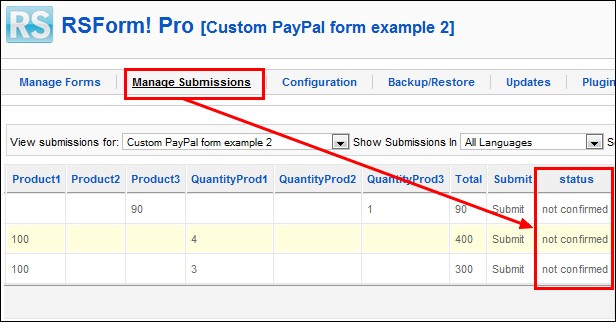
Once the user submits the form and completes the transaction, the RSForm!Pro status field value will be updated as "confirmed". By default, this field is "not confirmed".
Backend preview:
You can later check the payment status by accessing the backend Joomla! panel >>Components >> RSForm!Pro >> Manage Submissions.
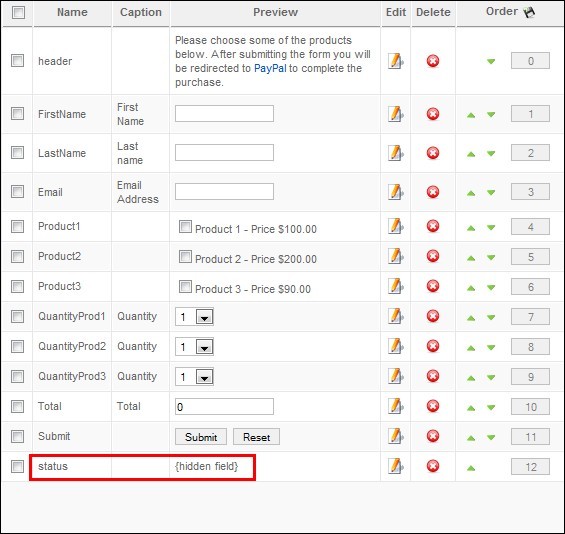
The 4th part of the article comes with a new form field (hidden field), that allows us to trigger the payment status. That involves several script changes.
Basically, the steps of creating the PayPal form are as described in the 3rd article.
In this article, we will only show the changes made to the above mentioned script to receive the payment confirmation.
Step 1: Add products, prices and quantities
In addition to the form components described in the previous article (textboxes for the First Name, Last Name, Email Address and Total, checkbox groups for products, dropdown for the quantity), you will need to create a hidden field , used to record the payment status: confirmed or not.
Step 2. Modify form layout
Once you have created the hidden field, head to the RSForm!Pro "Form layout" tab and add, at the end of the HTML code, the corresponding placeholder: {status:body}
Step 3: check the 3rd part of the article
Step 4:
When submitting the form, just before redirecting to PayPal, we need to pass the URL that will receive the confirmation. This will be the direct URL for the form. The new script is as follows:
if($_POST['form']['Total'] != '0')
{
$business = 'me@mybusiness.com';
$item_name = 'Products';
$currency_code = 'USD';
$amount = $_POST['form']['Total'];
$return = JURI::root();
$db = JFactory::getDBO();
$notify = urlencode(JURI::root().'index.php?option=com_rsform&formId='.$db->getEscaped($_POST['form']['formId']).'&submission='.$SubmissionId);
$url = 'https://www.sandbox.paypal.com/cgi-bin/webscr?cmd=_xclick&business='.$business.'&item_name='.$item_name.'¤cy_code='.$currency_code.'&amount='.$amount.'&return='.$return.'¬ify_url='.$notify;
header('Location: '.$url);
exit();
}
Explanations
The new addition is the use of the PayPal notify URL parameter: ¬ify_url . This will simply point back to the form with a parameter that will uniquely identify the submission that is being processed.
Notice the $SubmissionId variable.
Up next, we need to process the confirmation and update the status field. We can easily do this by using the following script, placed in the "Scripts called on form display" area, "Manage forms" tab :
$db = JFactory::getDBO();
$sid = JFactory::getApplication()->input->getInt('submission');
if(!empty($sid))
{
$db->setQuery("UPDATE #__rsform_submission_values SET `FieldValue` = 'confirmed' WHERE `SubmissionId` = '".$sid."' AND `FieldName` = 'status'");
$db->execute();
die();
}
Explanations
Based on the earlier mentioned $SubmissionId variable, we can identify the submission that is being confirmed and update the value of the status field. Note that the script will be executed only if the submission confirmation is received.
You can read more on the RSForm!Pro scripting areas here.
The scripting part is suitable for Joomla! 1.5 and 2.5 installations.
The example is available for download on the www.rsjoomla.com website. Notice that you must have at least RSForm!Pro rev. 36 in order to work.
Once you have downloaded the sample form, head to the Joomla! backend panel >> Components >> RSForm!Pro >>"Backup/Restore" tab and restore the package that you've just downloaded. You will find the Custom PayPal example listed in the RSForm!Pro "Manage Forms" tab.
Download the PayPal example with payment confirmation
Related articles:
- 3 ways to create a small Joomla! shopping cart with RSForm!Pro and Paypal - Part 1
- 3 ways to create a small Joomla! shopping cart with RSForm!Pro and Paypal - Part 2
- 3 ways to create a small Joomla! shopping cart with RSForm!Pro and PayPal - Part 3

Thank you for giving me feedback! I will send an email to support, hoping to understand me because my English is not very good ^^
QuoteYou are more then welcome to submit a support request so one of our staff members can have a look at this.Quote
I tried on a sample form of RSform but I have the same problem.
Quote@Camper
Have you tried restoring the sample form and work your way up from there ?
QuoteNo submit button
Hello,
QuoteI followed this tutorial but I don't have the submit button. I tried to put this field by hand according to the source code of the example. Unfortunately, the link sent to the paypal account of example and not mine. Is it possible to have the piece of code to put in RSform?
Like :
{Total:caption}
{Total:body}{To tal:validation} {Total:descript ion}
Thanks !
@RPPEO
There is none that would provide insight on your customization. Though not impossible, such a scenario would require a solid scripting knowledge.
QuoteHow do make this work with RSEvents?
Good morning folks. Trying to setup events in RSEvents Pro so that clients can book more than one event at a time rather than making many individual reservations. I was hoping that this would be a simple task but finding documentation that discusses this has been impossible to find.
QuoteThank you for your input.
@Pete
A similar feature is included within the standard PayPal plugin, via the "defer" options.
QuoteConfirm form when paypal confirmation received
Confirmation email paypal transaction
Hi, I have created forms to pay on paypal using the scripts provided on your site. Everything works fine, except that the confirmation mail is sent at submission of the form, and not upon paypal confirmation. This causes several problems with clients that do not pay but receive a confirmation mail anyhow. Can you please look into this ? Thanking you in advance, François Engelbrecht
Quote