Pages
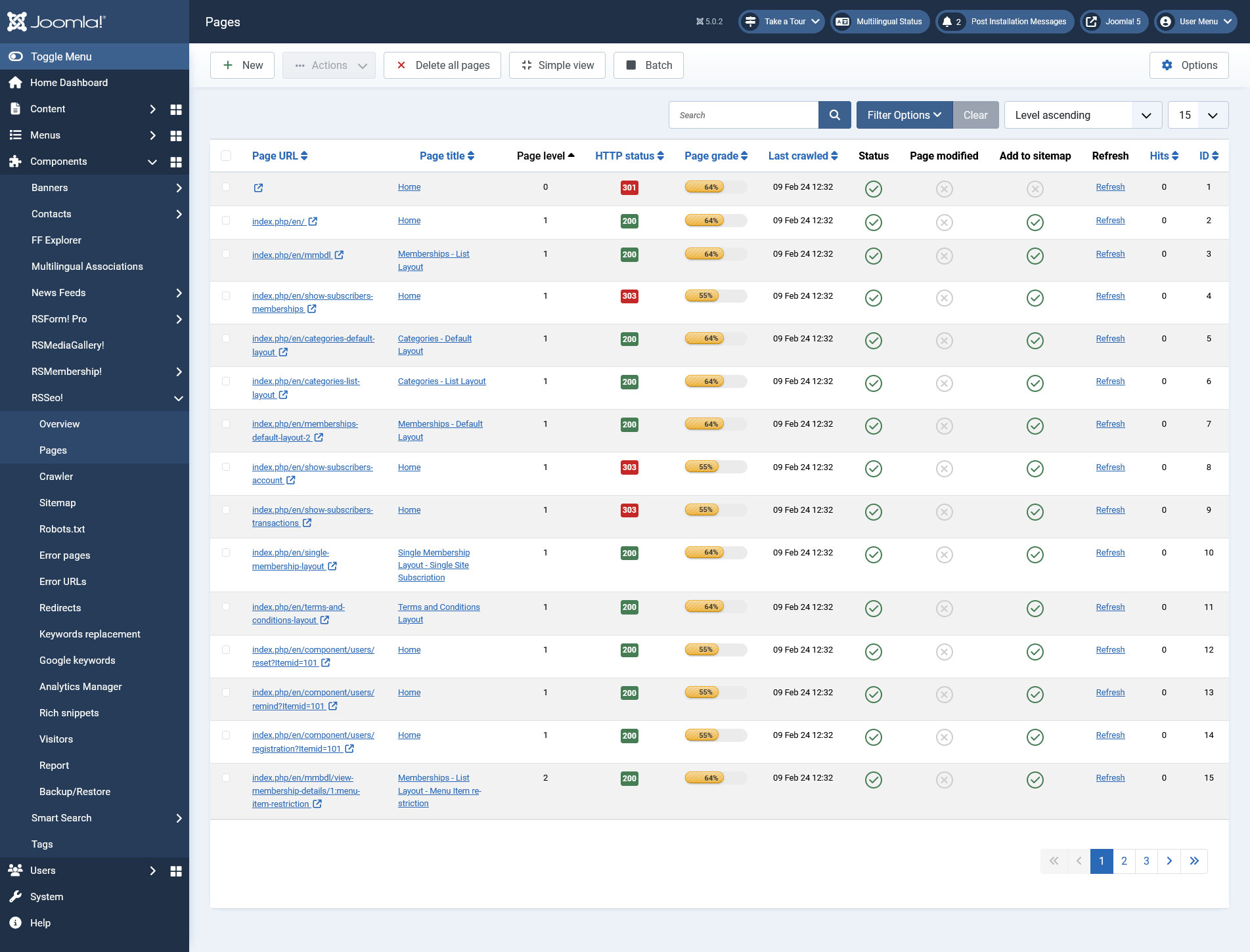
The RSSeo! Pages tab provides a general overview of your site's pages from a SEO point of view.
Here you can manually add pages for inspection or automatically add them via the RSSeo! Crawler. The general overview displays:
- Page URL - the URL of the added page
- Page Title - the title of the page
- Page Level - you can define a level for the added page. This applies only to those added manually.
- HTTP Status - displays the response status codes for each page.
- Page Grade - estimated grade for each page. RSSeo takes into consideration the following configurable options (within the RSSeo! Settings tab: URL is Search Engine Friendly, duplicate title tags, title tag length, duplicate meta description, meta description tag length, number of meta keywords, headings, images without the alt attribute, images without the height or width attribute
- Last Crawled - date of the last refresh that was performed on the page or when the page was last crawled
- Status - Published/Unpublished
- Page Modified - Displays if the page has been modified or not
- Add to sitemap - Select whether the page will be added to the sitemap or not
- Refresh - You can click this option in order to refresh the page
- Hits - The number of times the page has been visited
- ID - The page's internal id provided by RSSeo!
The General area
For each page you can view and edit all the SEO data:
- Page URL - the URL of the added page
- Status: set publication status
- Page Title - the title of the page
- Page Meta Keywords
- Page Meta Description
- Robots: you can use on each crawled page the meta robots tag to indicate search engines robots which page should or shouldn't be indexed. These are the default values:
- index, follow: Allows search engines to index the page content and follow the links found on the page.
- noindex, follow: Prevents search engines from indexing the page content, while still allowing them to follow the links found on the page.
- index, nofollow: Allows search engines to index the page content, but prevents them from following the links found on the page.
- noindex, nofollow: Prevents search engines from indexing the page content and from following any links found on the page.
- Canonical page: RSSeo! allows you to choose the canonical version of a certain page, by including in the header of each non-canonical URL the rel="canonical" attribute. This is useful when you want to remove duplicate Joomla! content and consolidate the Page Rank of a single page.
For mode details, you can check the below video tutorial. - Page level: this represents the hierarchical page level
Add Emoji to your meta data using their unicode within Page Meta Keywords and Page Meta Description, for example:
- 😇 - will result in: 😇
- 😋 - will result in: 😋
- 😲 - will result in: 😲
You can find a list of such emojis and their unicode here.
SEF Settings
- Custom SEF URL - Set a custom SEF URL for this page. Please do not add the suffix of the URL. (only available when the 'Enable custom SEF' configuration option is active. This also requires the 'Search Engine Friendly URLs' option to be enabled from Global Configuration > SEO Settings.
- Short URL - Create a short URL version of this URL (only available when the .htaccess file is configured and the 'Enable custom SEF' configuration option is active).
Sitemap settings
- Page frequency: is used to indicate search engines how often is the page content updated - hourly, daily, weekly, monthly, yearly or never. By default, the page frequency value is set to weekly.
- Page priority: is used in the XML sitemap, to indicate search engines the importance of a certain page within the entire website. You can choose from 0 to 1.0, where 0 is less important and 1.0 is considered the most important page. By default, RSSeo! sets the page priority to 0.5
Other settings
- Restore original: this will restore the original metadata for the page.
Some additional RSSeo! checks can be performed. For each of these items additional information and explanation will be displayed:
- SEO Grade: estimated grade for the current page;
- Search Friendly URL: The page URL is (not) search engine friendly! Search Engines prefer pages without dynamic parameters. Use an extension for Joomla!/default SEO parameters to make URLs more friendly and get a better index on search engine results page.
- Duplicate title tags: All the pages on your website should have unique page titles.
- Title tag length: Google uses the title tag to display the page in search results. Try to use more than 10 characters and create a unique title that will reflect accurately its content.
- Duplicate meta description: All the pages on your website should have unique page meta descriptions.
- Meta description tag length: Try to use more than 70 characters (including spaces) and create an unique meta description that will reflect accurately its content.
- Number of meta keywords: Try to limit the meta keywords of each page around 10 keywords. Some search engines may ignore the rest of the keywords.
- Headings: Headings are important because they announce search engines what will be the content underneath them.
- Internal/external links: This will check the number of internal and external links on the page.
- Page Images: the number of images the current page has.
- Images without the alt attribute: Try to limit the number of images to around 10 on each page.
- Images without the height or width attribute: Google guidelines recommend to use the "alt" attribute, describing accurately in a few words the image. Don't abuse it by using too many words because Google might consider this a spam method.
- Images with descriptive names: Setting the width and height attributes of an image will speed up page loading and improve the user experience.

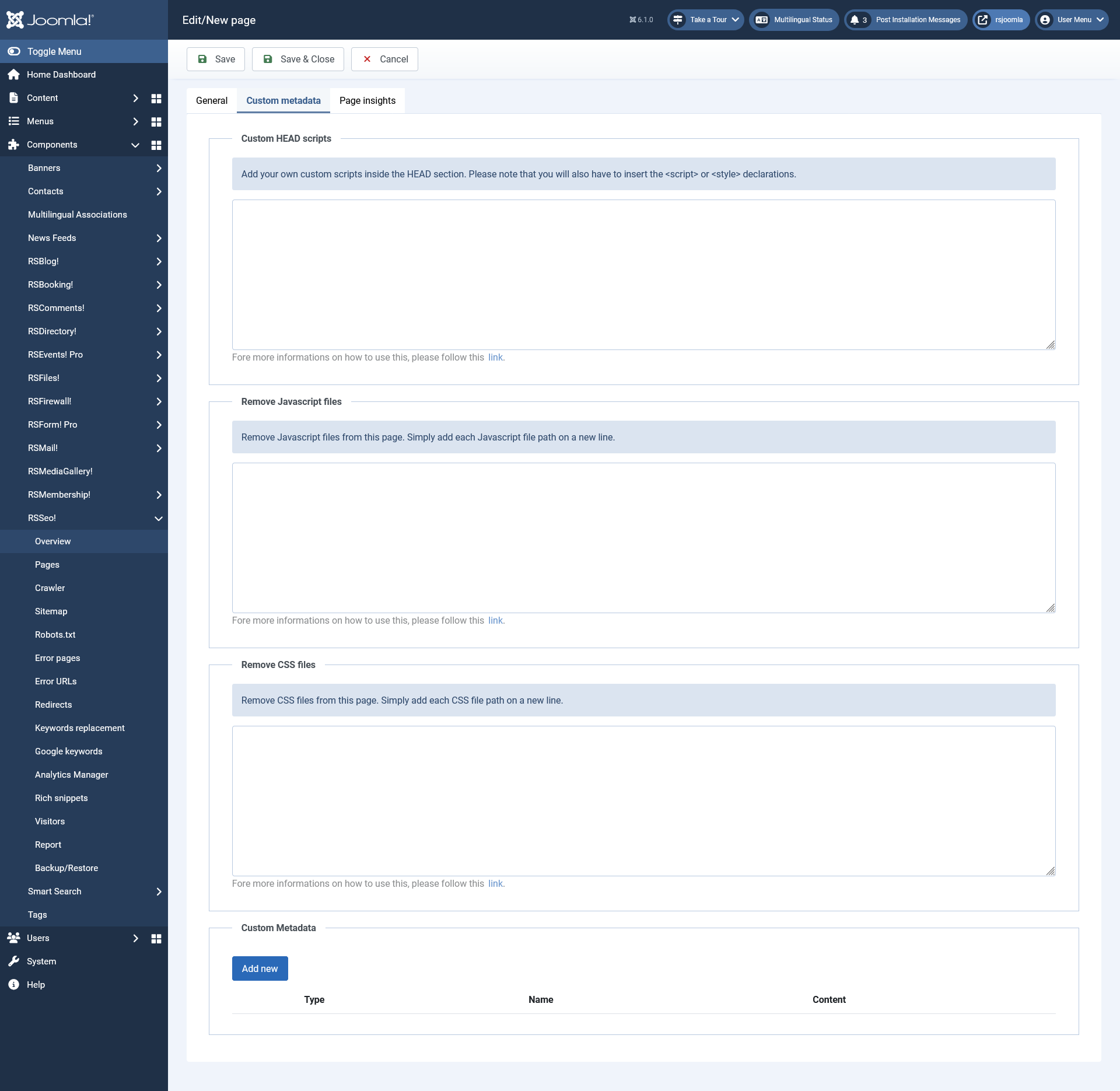
The Custom Metadata area
The CUSTOM HEAD SCRIPTS area
You can add your own custom scripts inside the HEAD section of a webpage, for example, CSS, JavaScript, AdWords or Language scripts. Fore more informations on how to use this, please follow this link
The Remove JavaScript files area
You can add the direct path to the JavaScript files without https:/ and without the automatically generated Hash as this is not a fixed value. Fore more informations on how to use this, please follow this link
The Remove CSS files area
You can add the direct path to the CSS files without https:/ and without the automatically generated Hash as this is not a fixed value. Fore more informations on how to use this, please follow this link
The CUSTOM METADATA area
You can add meta tags with custom Name and Property attributes. Of course, the content of these meta tags is also fully customizable.
- Add more button: adds another custom metadata row
- Type: Name / Property - the meta tag's attribute
- Name: The attribute's name
- Content: The meta tag's content
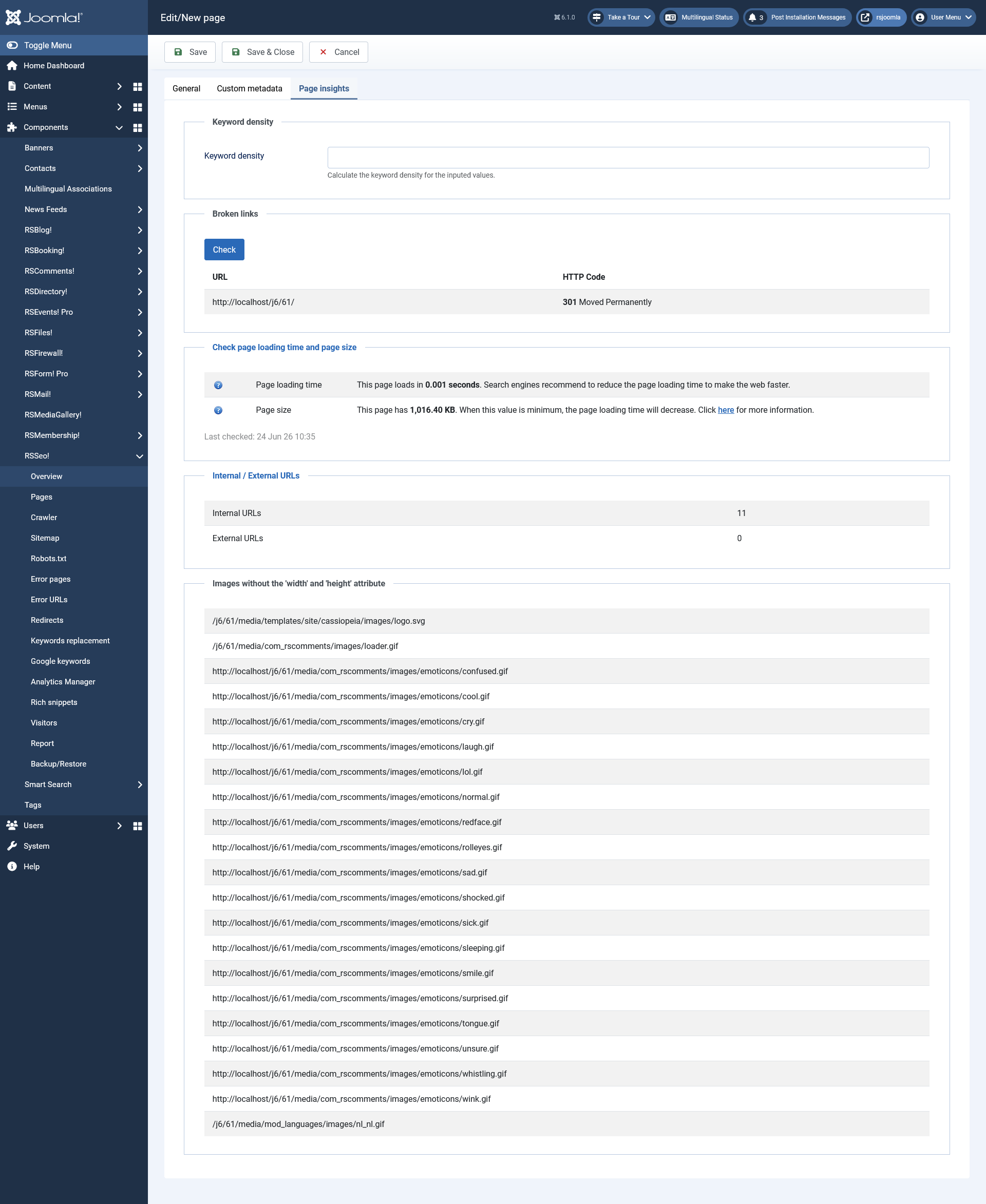
The Page Insights area
- Keyword Density: You can also calculate the density of your keywords on a specific page. All you need to do is enter the keyword(s) you want to calculate the density for in the "Calculate keyword density for" field and click Apply. The result will be displayed at the bottom of the page in this field.
- Broken links: RSSeo! offers the possibility to scan each page for broken links. To trigger this functionality, you need to click on the Check button. The results will include the URL and the HTTP Code.
- Check page loading time and page size
- Page loading time: Search engines recommend to reduce the page loading time to make the web faster.
- Page size: When this value is minimum, the page loading time will decrease. This item can be further checked by providing a report on loaded elements (in milliseconds) for the page in question.
- Internal / External URLs : This will check the number of internal and external links on the page.
- Images without the alt attribute: Try to limit the number of images to around 10 on each page.
- Images without the height or width attribute: Google guidelines recommend to use the "alt" attribute, describing accurately in a few words the image. Don't abuse it by using too many words because Google might consider this a spam method.
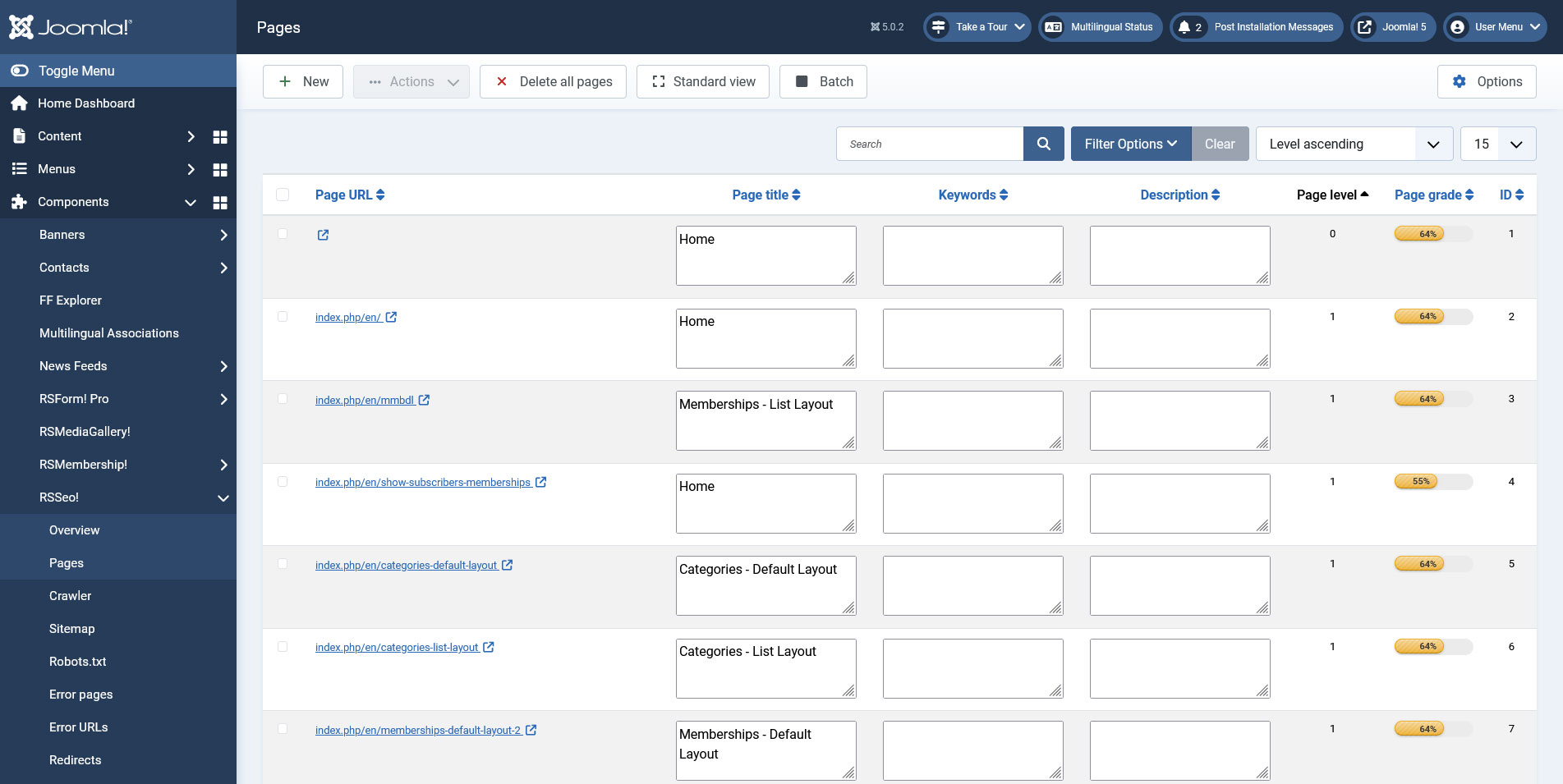
Simple View
For a quick editing of all your pages metadata, while viewing the Pages tab switch to the Simple View. While in Simple view you won't have to access each page separately in order to view and edit the following SEO data:
- Page URL
- Page Title
- Keywords
- Description
- Page Level
- Page grade
- ID
Batch Options
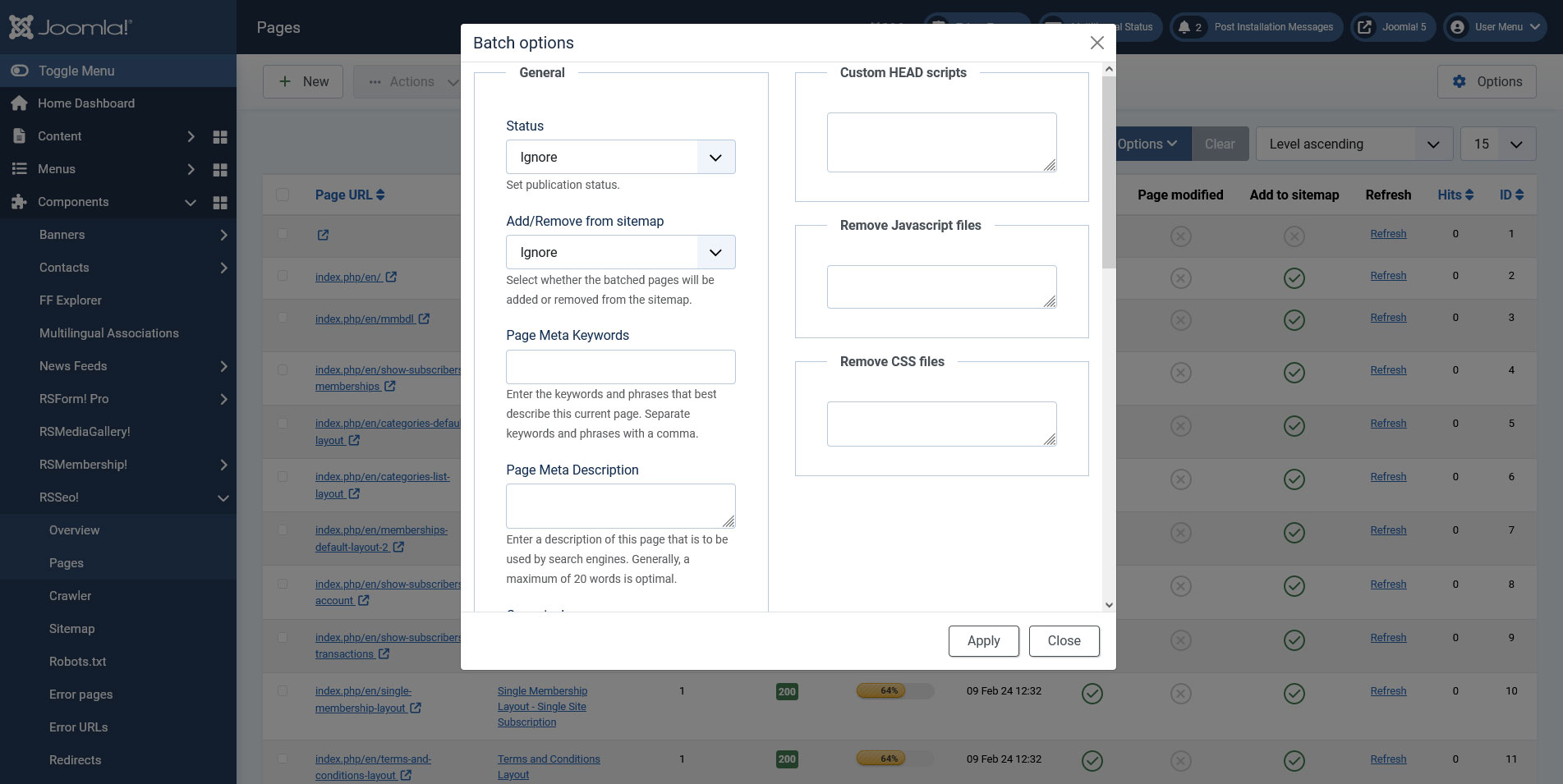
This functionality allows you to set the configuration options for multiple pages at the same time. All you need to do is to select the pages you would like to edit and afterwards click on the "Batch" button in the top menu. A popup window, as the one on the right, will be displayed.
You will be able to edit the following SEO data:
- StatusIgnore/Published/Unpublished - this option allows you to set the publication status
- Add/Remove from sitemapIgnore/Add/Remove - this option will allow you to select whether the batched pages will be added or removed from the sitemap.
- Page Meta Keywords - enter the keywords and phrases that best describe the selected pages. Separate keywords and phrases with a comma.
- Page Meta Description - enter a description of the selected pages that will to be used by search engines. Generally, a maximum of 20 words is optimal.
- Page frequency - How frequently the page is likely to change. This value provides general information to search engines and may not correlate exactly to how often they crawl the page.
- Page priority - The priority of this URL relative to other URLs on your site.
- Canonical page - a canonical page is the preferred version of a set of pages with highly similar content
- Robots:
- ignore
- index, follow: Allows search engines to index the page content and follow the links found on the page.
- noindex, follow: Prevents search engines from indexing the page content, while still allowing them to follow the links found on the page.
- index, nofollow: Allows search engines to index the page content, but prevents them from following the links found on the page.
- noindex, nofollow: Prevents search engines from indexing the page content and from following any links found on the page.
- Custom HEAD scripts - the scripts added in this section, will be included directly into the HEAD section of the selected pages.
- Remove JavaScript files - the JavaScript files added in this section, will be excluded from the selected pages.
- Remove CSS files - the CSS files added in this section, will be excluded from the selected pages.
18 persons found this article helpful.
