

Now you can embed RSForm! Pro forms within articles (com_content) and enable Joomla! caching. Keep reading to find out how.
You'll need the following:
- An up-to-date version of Joomla!. You can get it from the official Joomla! website
- An up-to-date version of RSForm! Pro. You can get it by clicking on My Memberships and then on the blue "download component" button next to your RSForm! Pro membership.
- The latest version of the "RSForm! Pro Content Plugin". You can get it by clicking on My Memberships, then on the blue "view all plugins and modules" - a window will popup. Here you have to browse "RSForm! Pro Files", "Plugins" and then you'll be able to download "RSForm! Pro Content Plugin".
If you're using Joomla! 1.5
- Click on Tools >
 Clean Cache
 - Tick "com_content" and "page"
- Click on Delete
If you're using Joomla! 2.5
- Click on Site >
 Maintenance >
  Clear Cache
 - Tick "com_content" and "page"
- Click on Delete
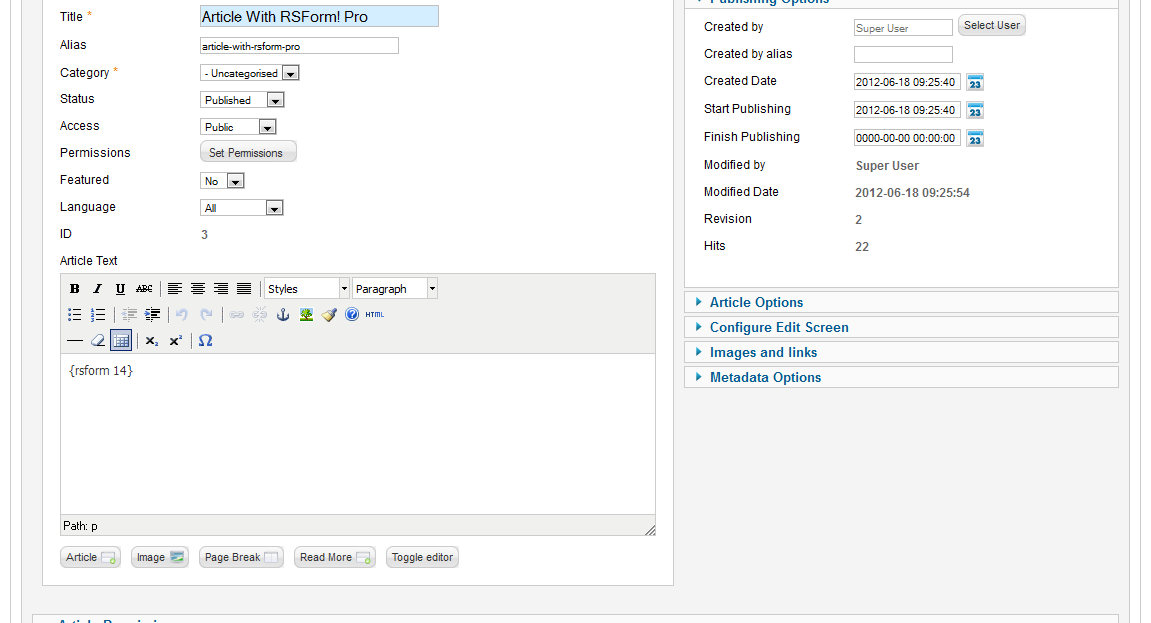
Now, embed your form inside an article. This is easy: create your form with RSForm! Pro and add the following syntax inside the article's text, anywhere where you would like to display the form:
{rsform 1}
Where 1 is your form's ID. To find the ID, go to RSForm! Pro > Manage Forms and copy it from the last column, named "Form ID". You can also read the article from the RSForm! Pro documentation that describes this.
These changes have been tested only with the latest versions of Joomla! (2.5.6 and 1.5.26 at the time of writing) but they should work with older versions as well - however, as always, it's best to have your Joomla! installation updated to the newest version (that goes the same for RSForm! Pro).

3.x?
So how about 3.x? Where's the workaround for that?
Quote@Tom
The article itself refers to Joomla! 1.5 and 2.5 installations.Quote
RSForm! Pro and Joomla! cache workarounds
This is not working in Joomla 3.4.3 and RSF 1.50.21 with plugin 1.0.0
Quote@Rochi
The instructions are provided for Joomla! 1.5 and 2.5, not 3.x.
QuoteRSForm! Pro 48 & Joomla 3.2.1
This does not work with RSForm! Pro 48 & Joomla 3.2.1.
QuoteMy forms don't load the first time a visitor visits them, but when doing a refresh the they load correctly.
Anybody else that has looked at this lately?
@John
This does not apply for modules. You can consider posting the form as a menu item instead.
QuoteDoesn't seem top work within Modules
My site uses forms within a module position. Once the cache is switched on the form seems to stop working completely.
QuoteUsing Joomla 2.5.3 and latest RSForms & Content module.
Any suggestions?
Tested and does work
A form on my site was affected by this, and I can confirm that the new updates do fix the issue!
QuoteThanks so much.
@Bianca
Up to this point having the forms embedded within articles and having the cache option enabled could have caused functionality issues. Using new plugin and the latest Joomla! versions will overcome this.
QuoteJoomla Cache
What does RSForm!Pro and Joomla! cache workarounds do? I would like to know its benefits.
Quote