Authorize.Net Payment Plugin
This RSEvents!Pro Authorize.Net Payment Plugin is commercial and needs to be purchased separately.
You can buy it by accessing Customer Area > My memberships > Active Memberships > clicking the 'Buy Extra Plugins' button of your RSEvents!Pro license.
The RSEvents!Pro Authorize.NET plugin allows users to pay for event subscriptions using Authorize.NET payment processor.
The plugin can be installed like just any other Joomla! extension: Extensions > Install / Uninstall , browse the file and click Upload and Install. More details on the installation process can be found here.
As configuration parameters, (RSEvents!Pro > Payment Integrations > RSEvents!Pro Authorize payment), you have the following options:
- Authorize API Login ID: your unique vendor login id, available in your Authorize.NET account
- Transaction key: available in your Authorize.NET account
- Mode: Test (sandbox) / Live
- Use secure links: if enabled, the payment page will use the https protocol for capturing the payment details.
- (optional) Tax Type: Percent (%) / Fixed Rate
- (optional) Tax Value: numeric value for tax

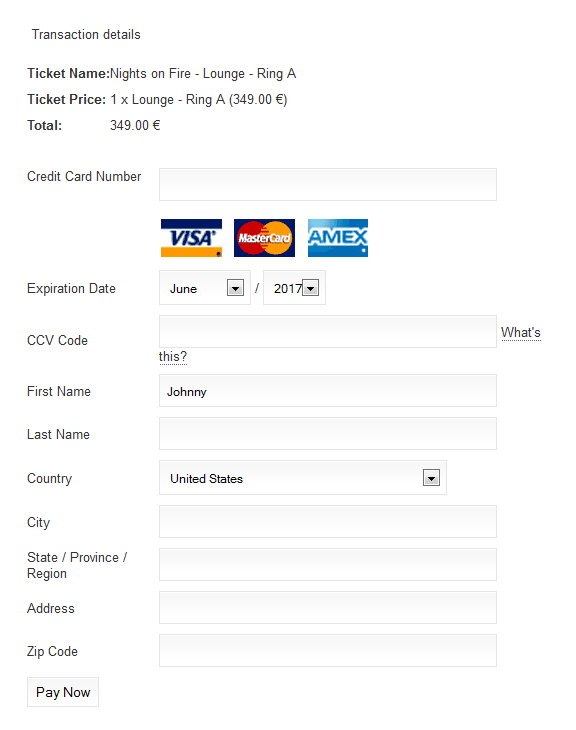
After the RSEvents!Pro subscription form has been filled, an additional payment will be required. This contains the following fields:
- Credit Card Number
- CC
- Expiration Date
- CCV Code
- First Name
- Last Name
- Country
- City
- State / Province / Region
- Address
- Zip Code
Note:
When using the test mode, you will require a sandbox account.
2 persons found this article helpful.
You Should Also Read
PayPal Payment Plugin HOT |
iDeal Payment Plugin HOT |
Virtual Merchant Payment Plugin |
Offline Payment Plugin |
Anz eGate Payment Plugin |
