Locations
As with events, locations can be added from both the front-end and back-end areas. The configuration process is the same in both cases. The Components >> RSEvents!Pro >> Locations area provides a simple location listing, with name, address, order and publishing status.
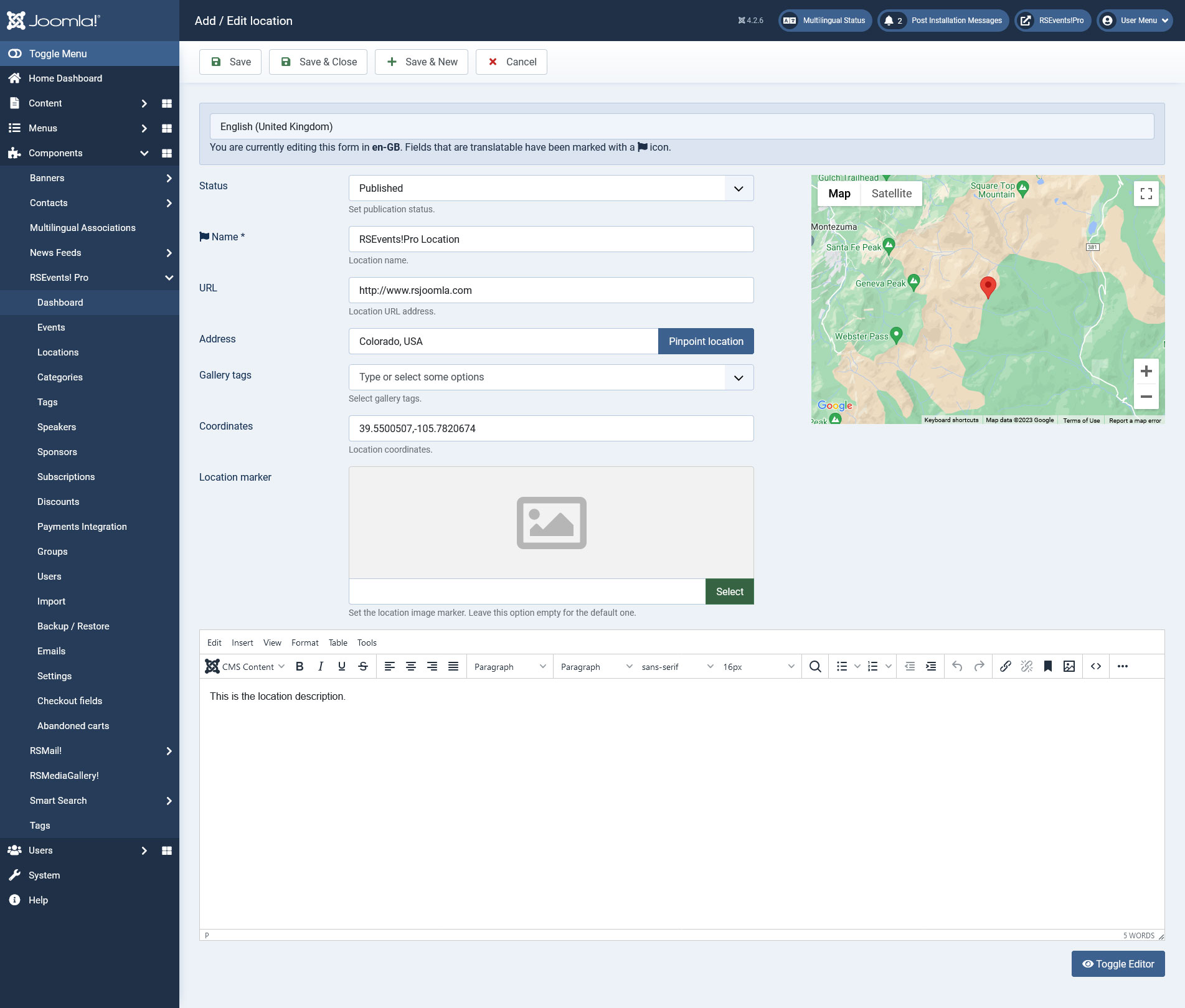
New / Edit Location
Clicking on the New button will open the location configuration options, as described below.
- Published: the publishing status.
- Name: the name of the location.
- URL: if the location is described on a separate site, here you can specify it's URL.
- Address: while typing in the address (city, state, zip, etc) a suggestion box will be displayed.
- Gallery: this option is available only if RSMediaGallery! is installed, along with the RSEvents!Pro - RSMediaGallery plugin. Basically this option allows you to display an image gallery, based on the selected image tags. To be able to use this, you will first have to upload the location images within RSMediaGallery!. Once these have been tagged, you are able to specify within the RSEvents!Pro Location configuration area which are image tags that will be included in the gallery.
- Description: this is a WYSIWYG editor area that allows to type in a more elaborate description of the location.
Furthermore, a Google Maps integration is also available. You can read more on its configuration options within RSEvents!Pro > Settings area. If the integration is enabled, you can pinpoint the location address on the Google Map. Coordinates are also displayed.